Each AI employee is a skill. The skills plugin holds all of them in one file, so you add your whole team at once. 🎉
Download it
In Getting started step 5, click Download skills plugin. Or open the Skills screen and click Download plugin (it says Download updated plugin when there is an update). You get howtoai-school-plugin.zip. Leave it zipped: don’t open or unzip it.
On the Skills screen, Show me how opens these same steps at the side of the screen, with a switch for Claude or ChatGPT.
Add it to Claude
- In Claude, click Customize in the menu on the left, then the Plugins tab.
- Click Add at the top right, then Upload plugin.
- Pick howtoai-school-plugin.zip from your Downloads folder. Every employee is added in one go.
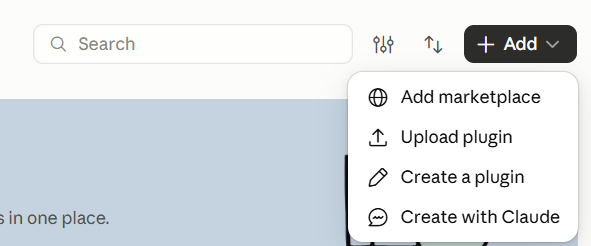
Tip: Want updates to arrive by themselves? Choose Add marketplace instead of Upload plugin, paste veenaprashanth/howtoai-skills and install howtoai-school.
Add it to ChatGPT
- In ChatGPT, click Plugins in the menu on the left.
- Click Add at the top right, then Upload plugin archive.
- Pick howtoai-school-plugin.zip from your Downloads folder.
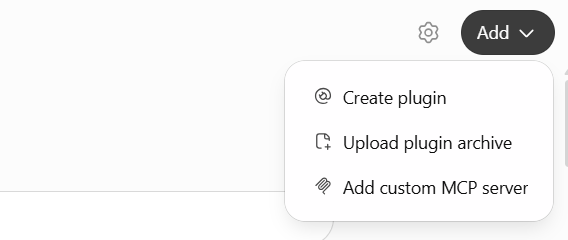
If ChatGPT says it couldn’t add the plugin, you added it before. Click Personal on the Plugins page, open HowToAI School, click the three dots and choose Upload new version.
Good to know: Added skills one by one before? Remove those old copies in Claude or ChatGPT, so they don’t run instead of the new ones.
Run an employee
Start a new chat and type the employee’s command, for example /howtoaischool-seo-audit https://yoursite.com. The Skills screen lists every command with a Copy button. In ChatGPT, press Enter twice: the first Enter only closes the small box that says No commands.
The skills plugin also includes two helpers that aren’t employees: Smart Prompt, which turns a vague request into a clear one (see Smart Prompt), and the SEO Auditor’s weekly check.


