Your AI team is grouped like a real team. Each employee does one job, and their work comes to you for review. 👥
Tip: Click an employee’s name to open its full guide: what it does, how to start it, the questions it asks and what you get back.
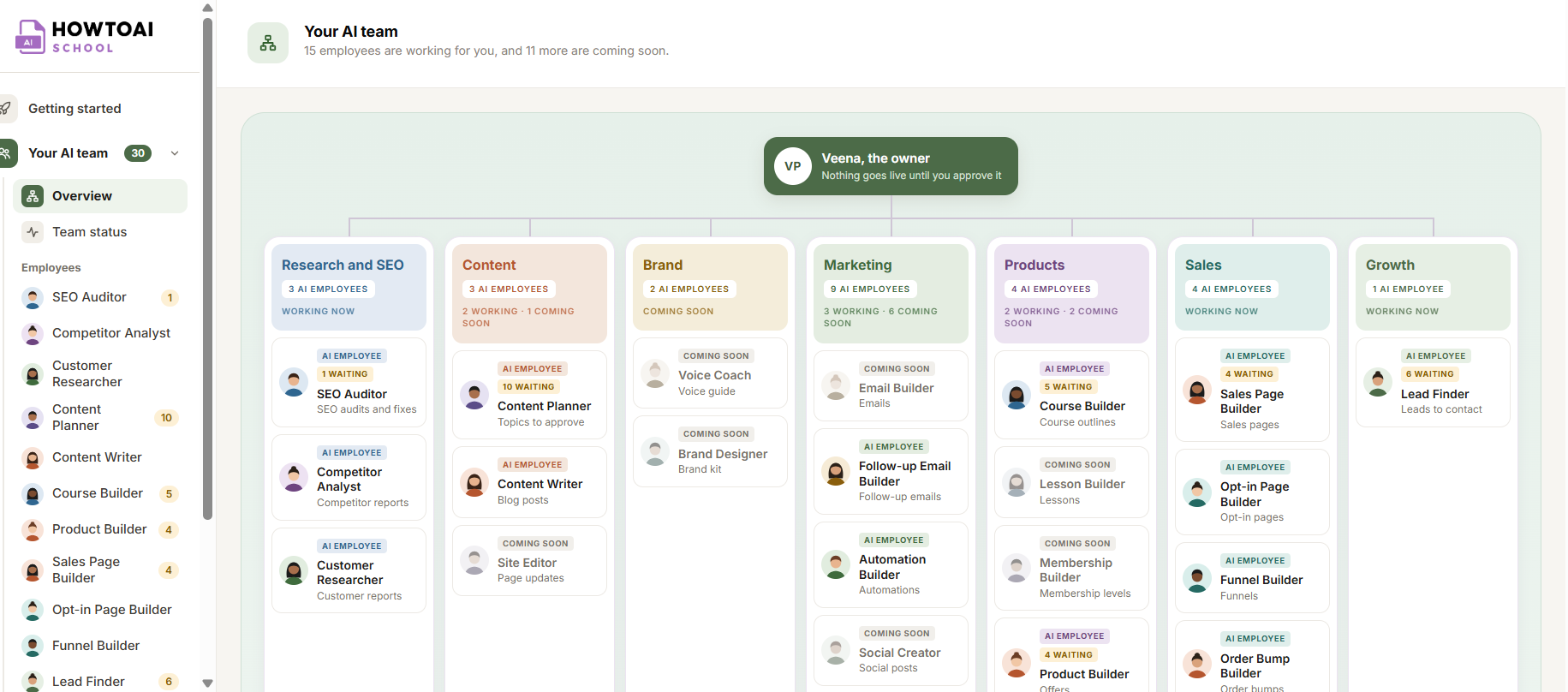
Research and SEO
- SEO Auditor: checks your website for problems that keep people from finding you on Google. It fixes small, safe ones itself and asks you about the rest.
- Competitor Analyst: finds who buyers compare you to and where you can win.
- Customer Researcher: reports what your buyers say about their problems, in their own words.
- X Content Scout: finds what’s trending on X in your topics and turns it into course, product and content ideas in your voice. It reads X in your own browser, so it runs only when you start it.
Content
- Content Planner: turns your research reports into ranked blog post ideas for you to say yes or no to.
- Content Writer: writes blog posts in your voice, as drafts for you to approve.
Marketing
- Follow-up Email Builder: writes the emails people get in the days after they join or buy.
- Automation Builder: sets up automations, like adding a tag when someone buys.
- Social Creator: turns one idea into a social post for each platform in Smart Social Schedule.
- Booking Manager: sets up the calls people book with you, free or paid, in Smart Events Calendar.
- Events Manager: sets up your events in Smart Events Calendar, one-off or repeating.
- Community Events Manager: sets up events in your Smart Community.
Products
- Course Builder: builds a full course: the outline, the lessons and a welcome email, as a draft.
- Product Builder: builds a digital product with its files, pages and pricing, as a draft.
Sales
- Sales Page Builder: writes a sales page in your voice and design.
- Opt-in Page Builder: builds a free opt-in page for a guide, course or product.
- Funnel Builder: builds a one-click upsell funnel.
- Order Bump Builder: builds the “add this to my order” box on your checkout page.
Growth
- Lead Finder: finds people and partners to contact, and drafts the message for you to send.
Good to know: Employees marked Coming soon join your team in a later update. The Skills screen lists exactly which skills your license includes.


