Open Settings → Follow and avoid. These rules shape everything your team writes, from blog posts to sales pages. ✍️
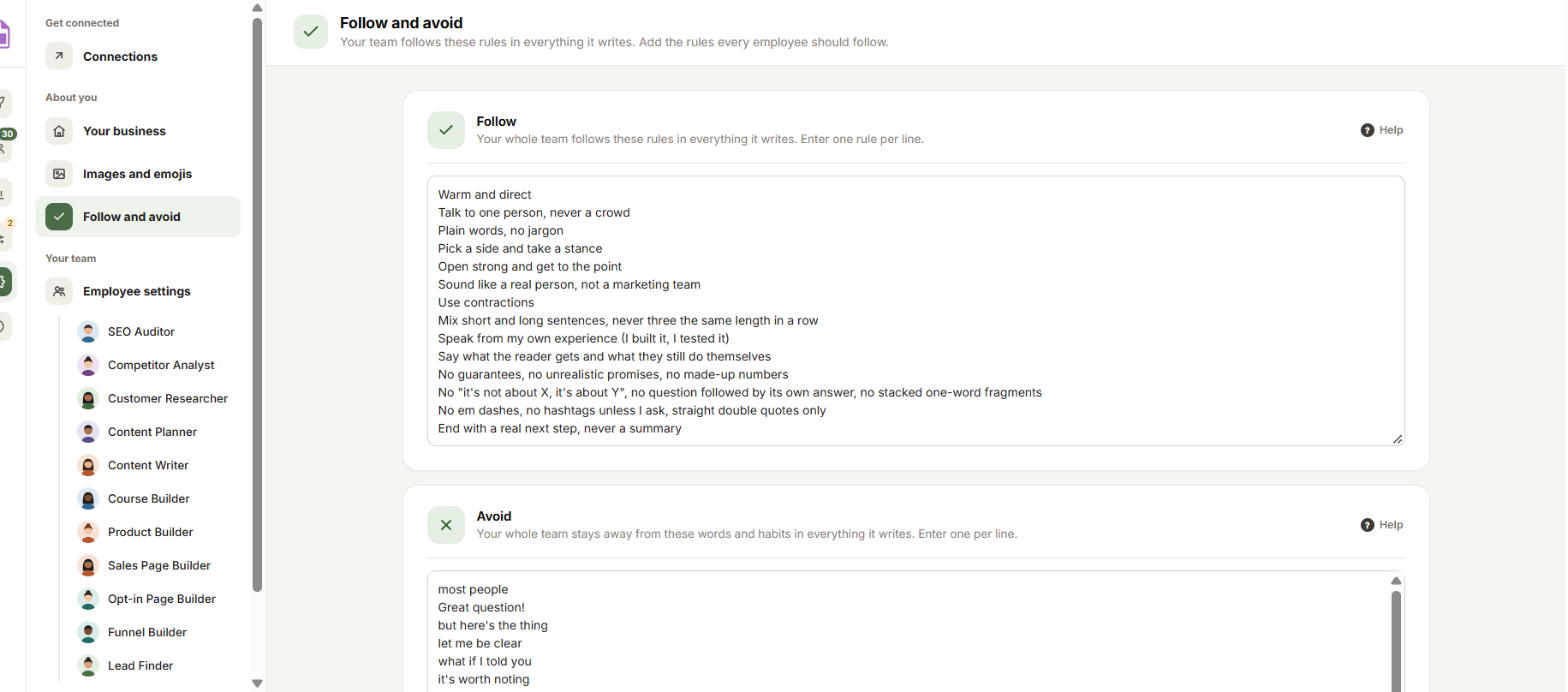
- Follow: how you write. One rule per line, like “Talk to one person” or “Plain words, no jargon”.
- Avoid: words and habits your team stays away from, like “game-changer”. One per line.
- Links to your writing: pages you wrote. Claude reads each one and keeps its words as a sample for every kind of writing. Click Add a link for another, or Remove to take one away.
- Samples for every kind of writing: shows only when you have older samples saved here. Your team reads them for every kind of writing. Click Remove on any that no longer sound like you.
Under each box it says who filled it in, when an employee added rules from what it learned about you. Change anything that’s wrong.
Save
Click Save changes in the bar at the bottom. Every employee uses your rules from its next run.
Rules for one kind of writing
Each employee’s own Writing style adds its samples and special instructions on top of these rules, for the kind of writing it does, like sales pages or emails. Click Open Employee settings in the note at the bottom to get there. See Employee settings.
Tip: Reset to defaults puts your Follow and Avoid rules back to the starting rules and removes their samples and links. You can undo it for 30 days. See Reset settings and undo.


